Exploration of novel Social Connections data to support Lloyds Bank Foundation with their place-based change work
Author
Just Knowledge Team
Published
October 17, 2025
Exploring Social Capital
Jolyon Miles-Wilson
17-10-2025
We’re currently exploring some opportunities to support Lloyds Bank Foundation with their place-based change work using novel data on Social Capital, based on data from Facebook.1 The aim is to understand how social capital can help identify and shape development stategies for areas at a hyperlocal level.
The Data
The dataset is based on 20.5 million active UK Facebook users with at least 100 friends, aged 25-64, which represents approximately 58% of the 25-64 UK population.2 It was produced through a collaboration between Meta, Behavioural Insights Team, the Royal Society of Arts, Stripe Partners, Neighbourly Lab, Opportunity Insights, New York University and Stanford University. During our time at the RSA, both Celestin and I were closely involved in this work.
The data contain many variables measuring different facets of social capital. For now, we focus on just one: Economic Connectedness. Economic Connectedness represents the proportion of friends of people of low socioeconomic status (SES) who are of high SES. In the seminal work in the US context by Chetty et al. (2022),3 Economic Connectedness was found to strongly predict upward social mobility.
The National View
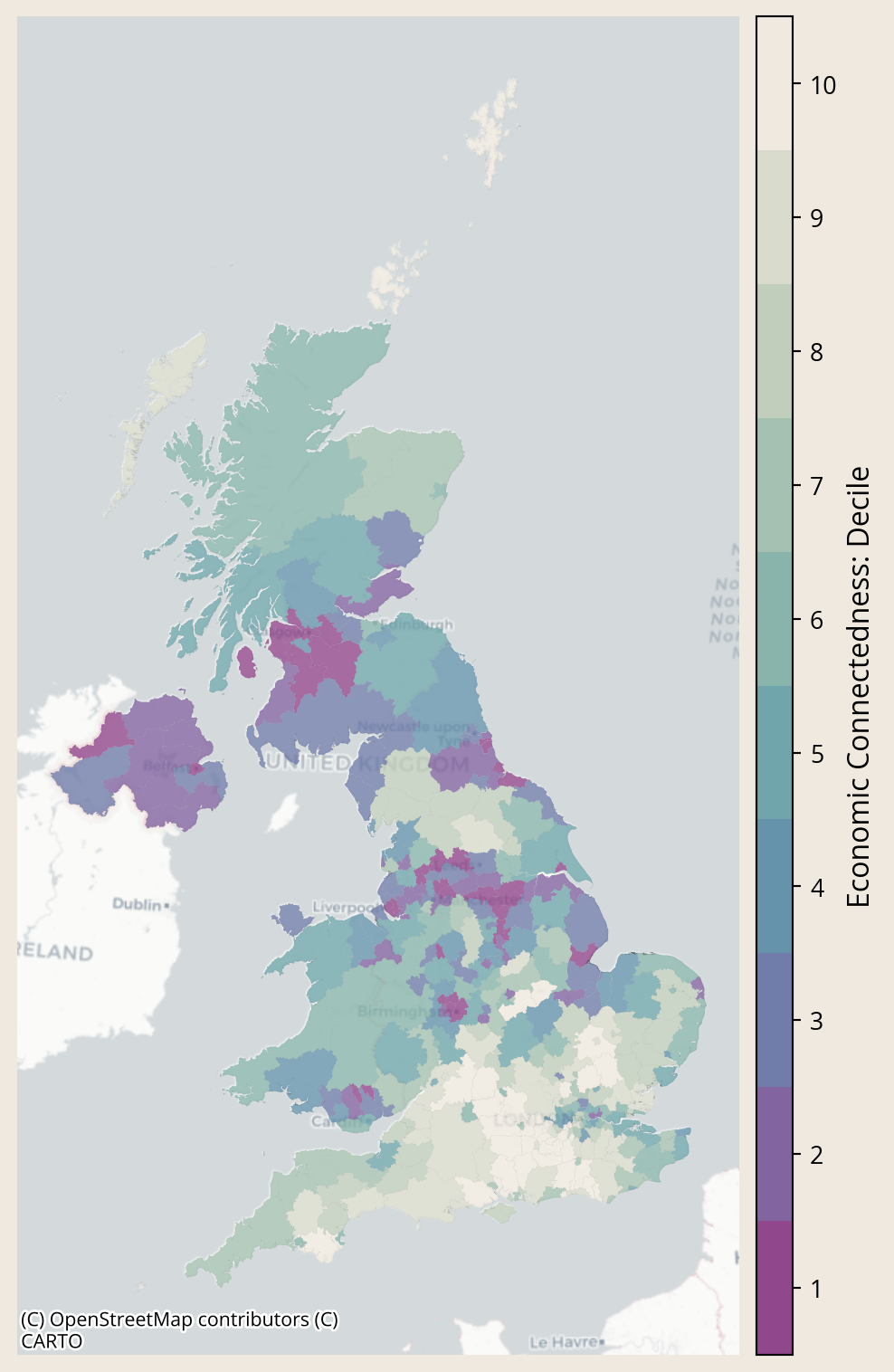
Social capital is stronger in the UK than it is in the US. But it is qualitatively different; in the UK it is driven by hobby groups, whereas in the US it is driven by religious groups.
While the overall picture is strong, social capital varies across England and Wales.
The Regional Picture
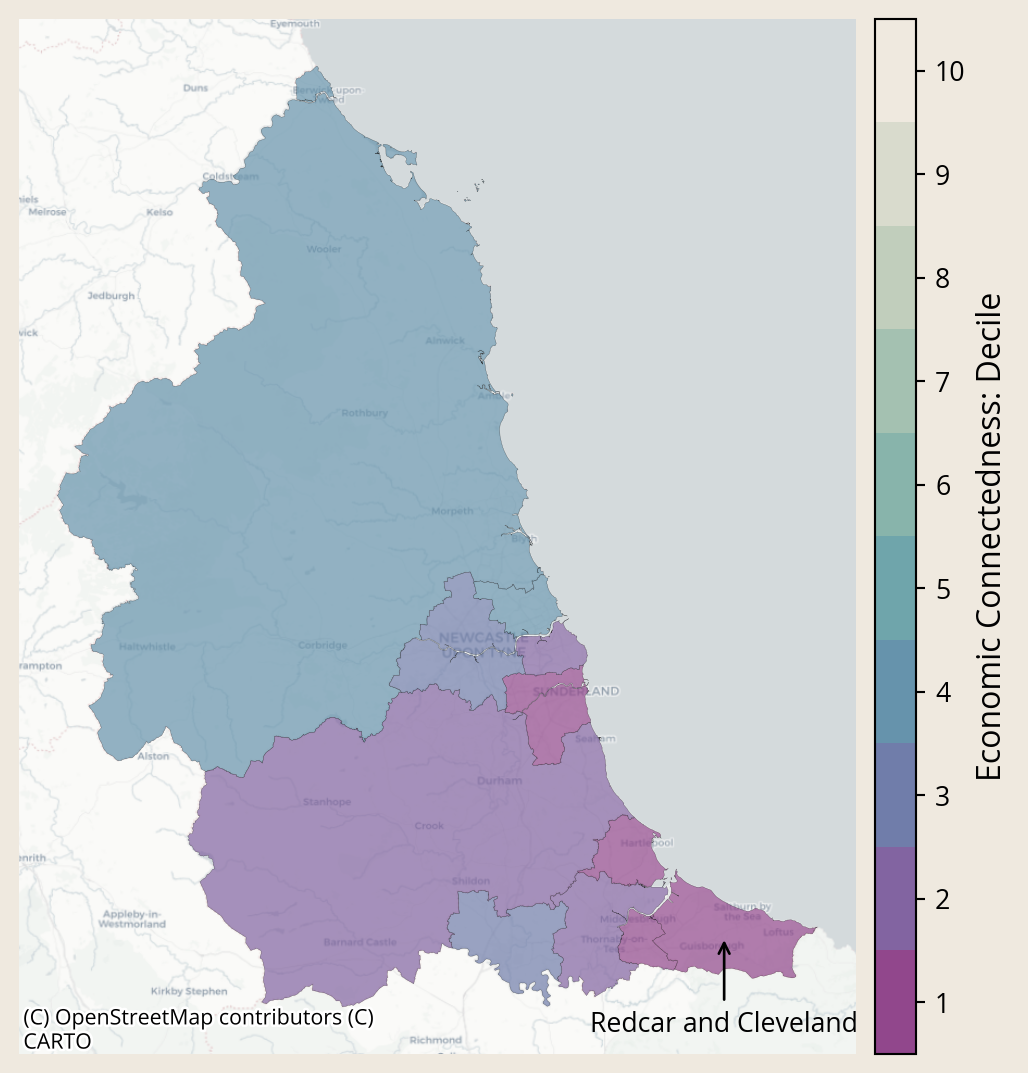
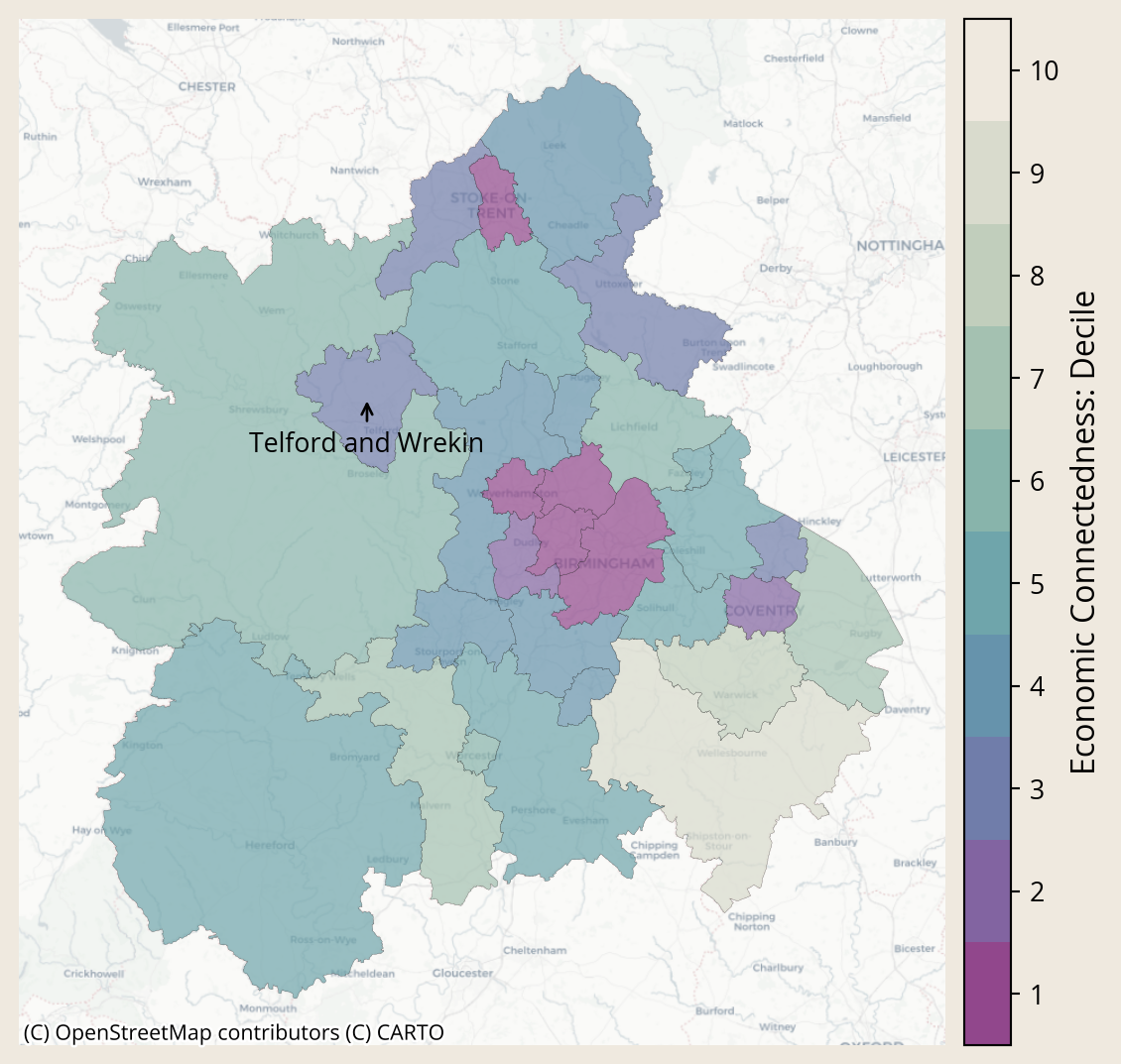
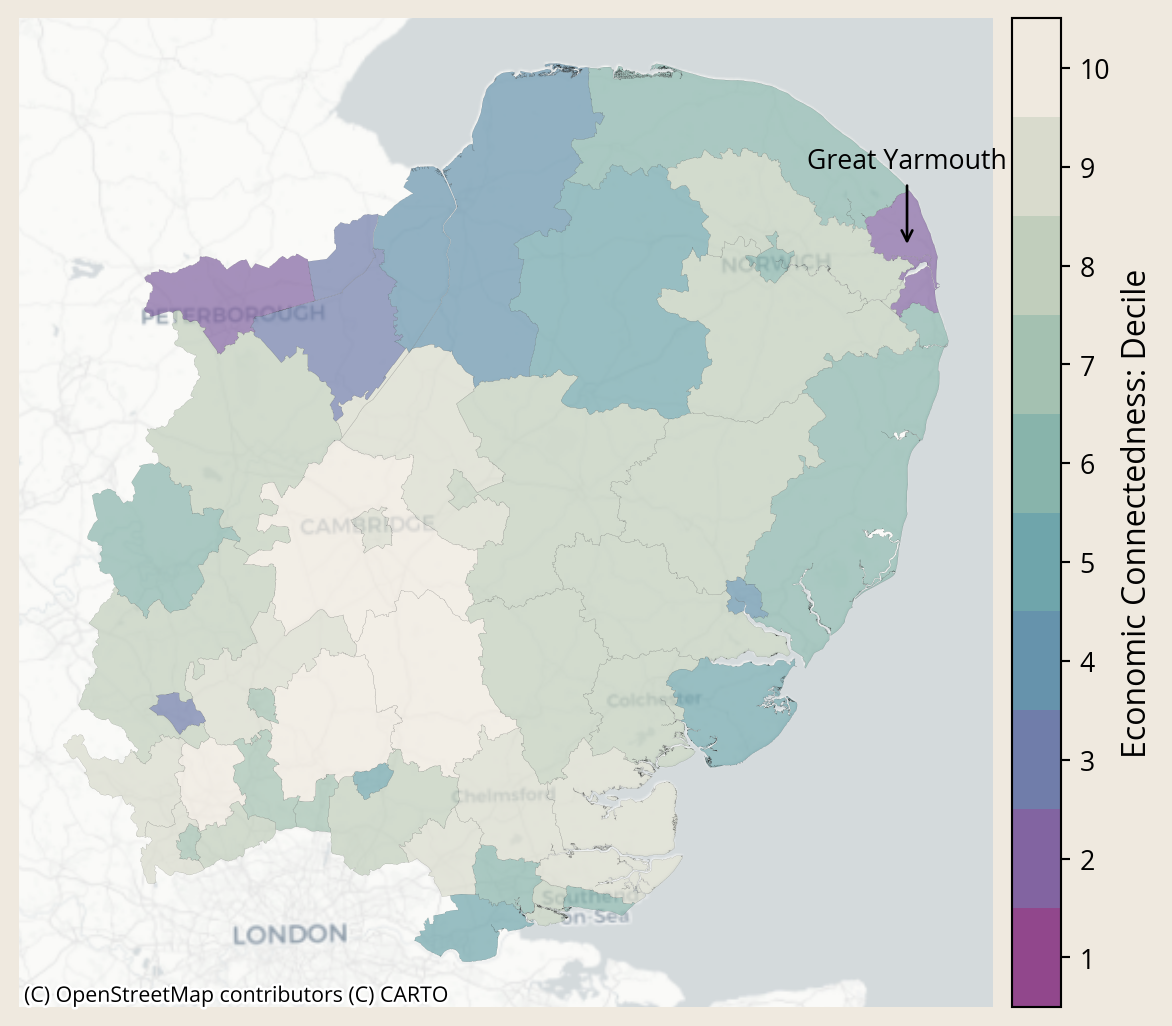
Social Capital varies from place to place, which may make it a particularly useful metric for judging the strengths and needs of local areas. Below, we can see how social capital varies between and within regions.4
Zooming in even further highlights that social capital can be hyperlocal. Below, we visualise small areas within local authorities to show how social connections vary from neighbourhood to neighbourhood.
We aim to further explore how these novel data on social capital can be put to use to help improve social outcomes. Stay tuned by subscribing to our newsletter below to hear about our progress.
Harris, T., Iyer, S., Rutter, T., Chi, G., Johnston, D., Lam, P., Makinson, L., Silva, A., Wessel, M., Liou, M.-C., Wang, Y., Zaman, Q., & Bailey, M. (2025). Social Capital in the United Kingdom: Evidence from Six Billion Friendships. OSF. https://doi.org/10.31235/osf.io/kb7dy_v1↩︎
Chetty, R., Jackson, M. O., Kuchler, T., Stroebel, J., Hendren, N., Fluegge, R. B., Gong, S., Gonzalez, F., Grondin, A., Jacob, M., Johnston, D., Koenen, M., Laguna-Muggenburg, E., Mudekereza, F., Rutter, T., Thor, N., Townsend, W., Zhang, R., Bailey, M., … Wernerfelt, N. (2022). Social capital I: Measurement and associations with economic mobility. Nature, 608(7921), 108–121. https://doi.org/10.1038/s41586-022-04996-4↩︎
We focus here only on this handful of areas because these are the places where some of Lloyds Bank Foundation’s work is already focused. The same exercise can be done for any place in the UK↩︎
Source Code
---title: "Exploring Social Capital"description: "Exploration of novel Social Connections data to support Lloyds Bank Foundation with their place-based change work"date: "2025-10-17"categories: [policy-impact, data-analysis, place-based-change]echo: falsedraft: falseimage: "/assets/images/blog/social-connections.png"code-tools: truecode-summary: "Code For Nerds"---{fig-align="center" height=300}# Exploring Social Capital ::: {.columns}::: {.column width="50%"} <div style="text-align: center;">*Jolyon Miles-Wilson*</div>:::::: {.column width="50%"}<div style="text-align: center;">*17-10-2025*</div>:::::: <!-- end columns -->We're currently exploring some opportunities to support Lloyds Bank Foundation with their **place-based change** work using novel data on Social Capital, based on data from Facebook.^[[https://data.humdata.org/dataset/uk-social-capital-atlas](https://data.humdata.org/dataset/uk-social-capital-atlas)] The aim is to understand how social capital can help identify and shape development stategies for areas at a hyperlocal level.## The Data The dataset is based on 20.5 million active UK Facebook users with at least 100 friends, aged 25-64, which represents approximately 58% of the 25-64 UK population.^[Harris, T., Iyer, S., Rutter, T., Chi, G., Johnston, D., Lam, P., Makinson, L., Silva, A., Wessel, M., Liou, M.-C., Wang, Y., Zaman, Q., & Bailey, M. (2025). Social Capital in the United Kingdom: Evidence from Six Billion Friendships. OSF. [https://doi.org/10.31235/osf.io/kb7dy_v1](https://doi.org/10.31235/osf.io/kb7dy_v1)] It was produced through a collaboration between Meta, Behavioural Insights Team, the Royal Society of Arts, Stripe Partners, Neighbourly Lab, Opportunity Insights, New York University and Stanford University. During our time at the RSA, both Celestin and I were closely involved in this work.The data contain many variables measuring different facets of social capital. For now, we focus on just one: **Economic Connectedness**. Economic Connectedness represents the **proportion of friends of people of low socioeconomic status (SES) who are of high SES**. In the seminal work in the US context by Chetty et al. (2022),^[Chetty, R., Jackson, M. O., Kuchler, T., Stroebel, J., Hendren, N., Fluegge, R. B., Gong, S., Gonzalez, F., Grondin, A., Jacob, M., Johnston, D., Koenen, M., Laguna-Muggenburg, E., Mudekereza, F., Rutter, T., Thor, N., Townsend, W., Zhang, R., Bailey, M., … Wernerfelt, N. (2022). Social capital I: Measurement and associations with economic mobility. Nature, 608(7921), 108–121. [https://doi.org/10.1038/s41586-022-04996-4](https://doi.org/10.1038/s41586-022-04996-4)] Economic Connectedness was found to strongly predict upward social mobility.```{python}# Packages and configimport pandas as pdimport requestsimport reimport geopandas as gpdfrom shapely.geometry import Pointimport matplotlib.pyplot as pltimport matplotlib as mplfrom mpl_toolkits.axes_grid1.axes_divider import make_axes_locatableimport contextily as cximport configparserimport janitorimport zipfileimport globfrom sqlalchemy import create_engineimport matplotlib.colors as mcolorsimport pickleimport osimport numpy as npconfig = configparser.ConfigParser()config.read(os.path.join('..', 'db_config.ini'))db_params =dict(config['postgresql'])# Load configconfig = configparser.ConfigParser()config.read(os.path.join('..', 'db_config.ini'))db_params =dict(config['postgresql'])# Build SQLAlchemy connection stringconn_str = (f"postgresql+psycopg2://{db_params['user']}:{db_params['password']}"f"@{db_params['host']}:{db_params['port']}/{db_params['database']}")# Create engineengine = create_engine(conn_str)``````{python}# Updated to appropriate file pathfilepath = os.path.join('..', 'assets', 'palettes', 'ice_swatch.txt')withopen(filepath, 'r', encoding='utf-8') asfile: ice_swatch = [line.strip() for line infileif line.strip()]# Make a colormapice_cmap = mcolors.LinearSegmentedColormap.from_list("ice", ice_swatch).reversed()# Updated to appropriate file pathwithopen(os.path.join('..', 'assets', 'palettes', 'jk_primary_colours.txt'), 'r') asfile: jk_colours = [line.strip() for line infile]# Fonthfont = {'fontname': 'Inclusive Sans'}nfont = {'fontname': 'Open Sans'}# Set global font family and sizeplt.rcParams['font.family'] ='Open Sans'plt.rcParams['axes.titlesize'] =14# size of the titleplt.rcParams['axes.labelsize'] =12mpl.rcParams["figure.facecolor"] = jk_colours[0]``````{python}# Download data if it doesn't exist, otherwise load itpath = os.path.join('data')ifnot os.path.exists(path): os.makedirs(path)# LADfile='lad_gpd.pkl'filepath = path +'/'+fileifnot os.path.exists(filepath):with engine.connect() as con: query =''' WITH lookup AS ( SELECT DISTINCT ON (lad21cd) loo.lad21cd, loo.ladnm as lad21nm, foo.rgn21nm_filled as rgn21nm FROM pcode_census21_lookup loo LEFT JOIN lad21_lookup foo ON loo.lad21cd = foo.lad21cd ) SELECT lookup.*, geom.geometry FROM lookup LEFT JOIN lad21_boundaries geom ON lookup.lad21cd = geom.lad21cd; ''' lad_gpd = gpd.read_postgis(query, con, geom_col='geometry')withopen(filepath, 'wb') asfile: pickle.dump(lad_gpd, file)else:withopen(filepath, 'rb') asfile: lad_gpd = pickle.load(file)# MSOAfile='msoa_gpd.pkl'filepath = path +'/'+fileifnot os.path.exists(filepath):with engine.connect() as con: query =''' WITH lookup AS ( SELECT DISTINCT ON (msoa21cd) loo.msoa21cd, loo.lad21cd, loo.ladnm as lad21nm, foo.rgn21nm_filled as rgn21nm FROM pcode_census21_lookup loo LEFT JOIN lad21_lookup foo ON loo.lad21cd = foo.lad21cd ) SELECT lookup.*, geom.geometry FROM lookup LEFT JOIN msoa21_boundaries geom ON lookup.msoa21cd = geom.msoa21cd; ''' msoa_gpd = gpd.read_postgis(query, con, geom_col='geometry')withopen(filepath, 'wb') asfile: pickle.dump(msoa_gpd, file)else:withopen(filepath, 'rb') asfile: msoa_gpd = pickle.load(file)# MSOA 11file='msoa11_gpd.pkl'filepath = path +'/'+fileifnot os.path.exists(filepath):with engine.connect() as con: query =''' WITH lookup AS ( SELECT DISTINCT ON (msoa11cd) loo.msoa11cd, loo.lad21cd, loo.lad21nm, foo.rgn21nm_filled as rgn21nm FROM pcode_census11_lookup loo LEFT JOIN lad21_lookup foo ON loo.lad21cd = foo.lad21cd ) SELECT lookup.*, geom.geometry FROM lookup LEFT JOIN msoa11_boundaries geom ON lookup.msoa11cd = geom.msoa11cd; ''' msoa11_gpd = gpd.read_postgis(query, con, geom_col='geometry')withopen(filepath, 'wb') asfile: pickle.dump(msoa11_gpd, file)else:withopen(filepath, 'rb') asfile: msoa11_gpd = pickle.load(file)file='lookup.pkl'filepath = path +'/'+fileifnot os.path.exists(filepath):with engine.connect() as con: query =''' SELECT DISTINCT ON (msoa21cd) loo.msoa21cd, loo.lad21cd, loo.ladnm as lad21nm, foo.rgn21nm_filled as rgn21nm FROM pcode_census21_lookup loo LEFT JOIN lad21_lookup foo ON loo.lad21cd = foo.lad21cd ''' lookup = pd.read_sql(sql=query, con=con)withopen(filepath, 'wb') asfile: pickle.dump(lookup, file)else:withopen(filepath, 'rb') asfile: lookup = pickle.load(file)``````{python}#| output: false#| # Get the actual published data### LAD #### 1. Specify the url that downloads the dataurl ='https://data.humdata.org/dataset/79d5959f-73b8-4305-bb9e-d829e2e863da/resource/f87c1d44-a56c-48cf-a8bb-1caad97aa589/download/local_authority-20250320t000233z-001.zip'# 2. Specify folder name as the final part of the url after it's been split on '/' and specify relative pathfolder = url.split('/')[-1]path = os.path.join('data', folder)# 3. If the path doesn't exist, download the data. If it does exist, skip this step.ifnot os.path.exists(path): req = requests.get(url)withopen(path, 'wb') as output_file: output_file.write(req.content)else:print('Data already downloaded. Loading')# 4. Unzip the folder## i. Define outpath as same as in path minus .zipout_path = os.path.splitext(path)[0] # This removes the .zip extension## ii. Create the extraction directory if it doesn't existifnot os.path.exists(out_path): os.makedirs(out_path)## iii. Unzip to extraction directorywith zipfile.ZipFile(path, 'r') as zip_ref: zip_ref.extractall(out_path)# 5. Identify the file in the directory you want to read and read itfilepath = glob.glob( os.path.join(out_path, "local_authority", "*_economic_connectedness_[0-9][0-9][0-9][0-9]*.csv"))meta_lad = pd.read_csv(filepath[0])meta_lad = meta_lad.drop(meta_lad.columns[0], axis=1)# For now let's concentrate only on low_ses_users. But we might # be interested to look at high_ses_users or the ratio of EC # between low and high users# We do this here so that we retain all areas in the subsequent join. We want to ensure# we have all areas and assign NA to areas not in the Meta data meta_lad = meta_lad.loc[meta_lad['measurement_category']=='low_ses_users']\ .rename(columns= {'high_ses_ratio': 'economic_connectedness'} )meta_lad = lad_gpd.merge(meta_lad, how='left', left_on='lad21cd', right_on='lad_code').drop(columns='lad_code')# Make decile variablemeta_lad['ec_decile'] = pd.qcut(meta_lad['economic_connectedness'], q=10, labels=[x for x inrange(10,0,-1)], duplicates="drop")### MSOA ##### 1. Specify the url that downloads the dataurl ='https://data.humdata.org/dataset/79d5959f-73b8-4305-bb9e-d829e2e863da/resource/b1c4a576-c469-4447-b822-7215a39afcd8/download/msoa-20250320t000309z-001.zip'# 2. Specify folder name as the final part of the url after it's been split on '/' and specify relative pathfolder = url.split('/')[-1]path = os.path.join('data', folder)# 3. If the path doesn't exist, download the data. If it does exist, skip this step.ifnot os.path.exists(path): req = requests.get(url)withopen(path, 'wb') as output_file: output_file.write(req.content)else:print('Data already downloaded. Loading')# 4. Unzip the folder## i. Define outpath as same as in path minus .zipout_path = os.path.splitext(path)[0] # This removes the .zip extension## ii. Create the extraction directory if it doesn't existifnot os.path.exists(out_path): os.makedirs(out_path)## iii. Unzip to extraction directorywith zipfile.ZipFile(path, 'r') as zip_ref: zip_ref.extractall(out_path)# 5. Identify the file in the directory you want to read and read itfilepath = glob.glob( os.path.join(out_path, "msoa", "*_economic_connectedness_[0-9][0-9][0-9][0-9]*.csv"))meta_msoa = pd.read_csv(filepath[0])meta_msoa = meta_msoa.drop(meta_msoa.columns[0], axis=1)# For now let's concentrate only on low_ses_users. But we might # be interested to look at high_ses_users or the ratio of EC # between low and high users# We do this here so that we retain all areas in the subsequent join. We want to ensure# we have all areas and assign NA to areas not in the Meta data meta_msoa = meta_msoa.loc[meta_msoa['measurement_category']=='low_ses_users']\ .rename(columns= {'high_ses_ratio': 'economic_connectedness'} )meta_msoa = msoa_gpd.merge(meta_msoa, how='left', left_on='msoa21cd', right_on='zip_prediction').drop(columns='zip_prediction')# Make decile variablemeta_msoa['ec_decile'] = pd.qcut(meta_msoa['economic_connectedness'], q=10, labels=[x for x inrange(10,0,-1)], duplicates="drop")```## The National ViewSocial capital is stronger in the UK than it is in the US. But it is qualitatively different; in the UK it is driven by hobby groups, whereas in the US it is driven by religious groups.While the overall picture is strong, social capital varies across England and Wales.```{python}#| fig-align: center# variable = 'economic_connectedness'variable ='ec_decile'variable_clean = variable.title().replace('_',' ')fig, ax = plt.subplots(1,1, figsize = [15,10])meta_lad.plot( ax = ax, column = variable, cmap=ice_cmap, alpha=0.8, legend=False, edgecolor='black', linewidth=0.01, missing_kwds={"color": "lightgrey", # fill color for NA"edgecolor": "black", # optional outline for NA polygons"hatch": "///", # optional hatch for NA areas"label": "Missing"# adds entry to legend if legend=True } )# Create discrete colormapcolors = [ice_cmap(i/9) for i inrange(10)] # sample 10 discrete colors - using i/9 ensures last colour is usedcmap_discrete = mpl.colors.ListedColormap(colors)# Use a simple normalize from 1 to 10norm = mpl.colors.Normalize(vmin=1, vmax=11)sm = mpl.cm.ScalarMappable(cmap=cmap_discrete, norm=norm)sm._A = []divider = make_axes_locatable(ax)cax = divider.append_axes("right", size="5%", pad=0.1)# Create colorbarcbar = fig.colorbar(sm, cax=cax)# Set custom ticks at bin centerstick_positions = [i +0.5for i inrange(1, 11)] # 1.5, 2.5, ..., 9.5cbar.set_ticks(tick_positions)cbar.set_ticklabels(range(1, 11)) # label them 1–10cbar.set_label('Economic Connectedness: Decile', fontsize=12)cx.add_basemap(ax, crs=meta_lad.crs, source=cx.providers.CartoDB.Positron)# ax.set_title(f"{variable_clean}: England and Wales", fontsize=14, **hfont)ax.set_axis_off();```<!-- Start regions -->```{python}lads = ['Great Yarmouth','Redcar and Cleveland','Telford and Wrekin']areas_of_interest = lookup.loc[lookup['lad21nm'].isin(lads),['lad21nm','rgn21nm']].drop_duplicates().reset_index(drop=True)```## The Regional Picture {.smaller}Social Capital varies from place to place, which may make it a particularly useful metric for judging the strengths and needs of local areas. Below, we can see how social capital varies between and within regions.^[We focus here only on this handful of areas because these are the places where some of Lloyds Bank Foundation's work is already focused. The same exercise can be done for any place in the UK]::: {.panel-tabset}```{python}area_of_interest = areas_of_interest.iloc[0,0]region_of_interest = areas_of_interest.iloc[0,1]```### `{python} region_of_interest`This map shows Economic Connectedness by **Local Authority District** for the **`{python} region_of_interest`**.Purple values indicate lower Economic Connectedness. Whiter values indicate higher Economic Connectedness.```{python}variable ='ec_decile'variable_clean = variable.title().replace('_',' ')meta_subset = meta_lad.loc[meta_lad['rgn21nm'].str.contains(region_of_interest, na=False)]fig, ax = plt.subplots(1,1, figsize = [7,7])meta_subset.plot( ax = ax, column = variable, cmap=ice_cmap, alpha=0.7, legend=False, edgecolor='black', linewidth=0.1, missing_kwds={"color": "lightgrey", # fill color for NA"edgecolor": "black", # optional outline for NA polygons"hatch": "///", # optional hatch for NA areas"label": "Missing"# adds entry to legend if legend=True })# Scale the legend bardivider = make_axes_locatable(ax)cax = divider.append_axes("right", size="5%", pad=0.1)# Create discrete colormapcolors = [ice_cmap(i/9) for i inrange(10)] # sample 10 discrete colors - using i/9 ensures last colour is usedcmap_discrete = mpl.colors.ListedColormap(colors)# Use a simple normalize from 1 to 10norm = mpl.colors.Normalize(vmin=1, vmax=11)sm = mpl.cm.ScalarMappable(cmap=cmap_discrete, norm=norm)sm._A = []# Create colorbarcbar = fig.colorbar(sm, cax=cax)# Set custom ticks at bin centerstick_positions = [i +0.5for i inrange(1, 11)] # 1.5, 2.5, ..., 9.5cbar.set_ticks(tick_positions)cbar.set_ticklabels(range(1, 11)) # label them 1–10cbar.set_label('Economic Connectedness: Decile', fontsize=12)aoi = meta_subset.loc[meta_subset['lad21nm']==area_of_interest]xy = np.array([aoi.centroid.x.values[0], aoi.centroid.y.values[0]])nudge = [1, .97]xy_nudged= xy * nudge# xy = aoi.centroidax.annotate(area_of_interest, xy=xy, xytext=xy_nudged, arrowprops=dict(arrowstyle="->"), ha='center')cx.add_basemap(ax, crs=meta_subset.crs, source=cx.providers.CartoDB.Positron)ax.set_axis_off();# ax.set_title(f"{variable_clean}: {region_of_interest}", fontsize=14);``````{python}area_of_interest = areas_of_interest.iloc[1,0]region_of_interest = areas_of_interest.iloc[1,1]```### `{python} region_of_interest`This map shows Economic Connectedness by **Local Authority District** for the **`{python} region_of_interest`**.Purple values indicate lower Economic Connectedness. Whiter values indicate higher Economic Connectedness.```{python}variable ='ec_decile'variable_clean = variable.title().replace('_',' ')meta_subset = meta_lad.loc[meta_lad['rgn21nm'].str.contains(region_of_interest, na=False)]fig, ax = plt.subplots(1,1, figsize = [7,7])meta_subset.plot( ax = ax, column = variable, cmap=ice_cmap, alpha=0.7, legend=False, edgecolor='black', linewidth=0.1, missing_kwds={"color": "lightgrey", # fill color for NA"edgecolor": "black", # optional outline for NA polygons"hatch": "///", # optional hatch for NA areas"label": "Missing"# adds entry to legend if legend=True })# Scale the legend bardivider = make_axes_locatable(ax)cax = divider.append_axes("right", size="5%", pad=0.1)# Create discrete colormapcolors = [ice_cmap(i/9) for i inrange(10)] # sample 10 discrete colors - using i/9 ensures last colour is usedcmap_discrete = mpl.colors.ListedColormap(colors)# Use a simple normalize from 1 to 10norm = mpl.colors.Normalize(vmin=1, vmax=11)sm = mpl.cm.ScalarMappable(cmap=cmap_discrete, norm=norm)sm._A = []# Create colorbarcbar = fig.colorbar(sm, cax=cax)# Set custom ticks at bin centerstick_positions = [i +0.5for i inrange(1, 11)] # 1.5, 2.5, ..., 9.5cbar.set_ticks(tick_positions)cbar.set_ticklabels(range(1, 11)) # label them 1–10cbar.set_label('Economic Connectedness: Decile', fontsize=12)aoi = meta_subset.loc[meta_subset['lad21nm']==area_of_interest]xy = np.array([aoi.centroid.x.values[0], aoi.centroid.y.values[0]])nudge = [1, .97]xy_nudged= xy * nudge# xy = aoi.centroidax.annotate(area_of_interest, xy=xy, xytext=xy_nudged, arrowprops=dict(arrowstyle="->"), ha='center')cx.add_basemap(ax, crs=meta_subset.crs, source=cx.providers.CartoDB.Positron)ax.set_axis_off();# ax.set_title(f"{variable_clean}: {region_of_interest}", fontsize=14);``````{python}area_of_interest = areas_of_interest.iloc[2,0]region_of_interest = areas_of_interest.iloc[2,1]```### `{python} region_of_interest`This map shows Economic Connectedness by **Local Authority District** for the **`{python} region_of_interest`**.Purple values indicate lower Economic Connectedness. Whiter values indicate higher Economic Connectedness.```{python}variable ='ec_decile'variable_clean = variable.title().replace('_',' ')meta_subset = meta_lad.loc[meta_lad['rgn21nm'].str.contains(region_of_interest, na=False)]fig, ax = plt.subplots(1,1, figsize = [7,7])meta_subset.plot( ax = ax, column = variable, cmap=ice_cmap, alpha=0.7, legend=False, edgecolor='black', linewidth=0.04, missing_kwds={"color": "lightgrey", # fill color for NA"edgecolor": "black", # optional outline for NA polygons"hatch": "///", # optional hatch for NA areas"label": "Missing"# adds entry to legend if legend=True })# Scale the legend bardivider = make_axes_locatable(ax)cax = divider.append_axes("right", size="5%", pad=0.1)# Create discrete colormapcolors = [ice_cmap(i/9) for i inrange(10)] # sample 10 discrete colors - using i/9 ensures last colour is usedcmap_discrete = mpl.colors.ListedColormap(colors)# Use a simple normalize from 1 to 10norm = mpl.colors.Normalize(vmin=1, vmax=11)sm = mpl.cm.ScalarMappable(cmap=cmap_discrete, norm=norm)sm._A = []# Create colorbarcbar = fig.colorbar(sm, cax=cax)# Set custom ticks at bin centerstick_positions = [i +0.5for i inrange(1, 11)] # 1.5, 2.5, ..., 9.5cbar.set_ticks(tick_positions)cbar.set_ticklabels(range(1, 11)) # label them 1–10cbar.set_label('Economic Connectedness: Decile', fontsize=12)aoi = meta_subset.loc[meta_subset['lad21nm']==area_of_interest]xy = np.array([aoi.centroid.x.values[0], aoi.centroid.y.values[0]])nudge = [1, 1.05]xy_nudged= xy * nudge# xy = aoi.centroidax.annotate(area_of_interest, xy=xy, xytext=xy_nudged, arrowprops=dict(arrowstyle="->"), ha='center')cx.add_basemap(ax, crs=meta_subset.crs, source=cx.providers.CartoDB.Positron)ax.set_axis_off();# ax.set_title(f"{variable_clean}: {region_of_interest}", fontsize=14);```:::<!-- End tabset --><!-- Start LADs -->## Social Capital is Hyper-local {.smaller}Zooming in even further highlights that social capital can be hyperlocal. Below, we visualise small areas within local authorities to show how social connections vary from neighbourhood to neighbourhood.::: {.panel-tabset}```{python}area_of_interest = areas_of_interest.iloc[0,0]region_of_interest = areas_of_interest.iloc[0,1]```### `{python} area_of_interest`This map shows Economic Connectedness by **Middle layer Super Output Area** for **`{python} area_of_interest`**.Purple values indicate lower Economic Connectedness. Whiter values indicate higher Economic Connectedness.```{python}variable ='ec_decile'variable_clean = variable.title().replace('_',' ')# meta_subset = meta_msoa.loc[meta_msoa['lad21nm'].str.contains(area_of_interest)]meta_subset = meta_msoa.loc[meta_msoa['lad21nm'] == area_of_interest]fig, ax = plt.subplots(1,1, figsize = [7,7])meta_subset.plot( ax = ax, column = variable, cmap=ice_cmap, alpha=0.7, legend=False, edgecolor='black', linewidth=0.2, missing_kwds={"color": "lightgrey", # fill color for NA"edgecolor": "black", # optional outline for NA polygons"hatch": "///", # optional hatch for NA areas"label": "Missing"# adds entry to legend if legend=True })# Scale the legend bardivider = make_axes_locatable(ax)cax = divider.append_axes("right", size="5%", pad=0.1)# Create discrete colormapcolors = [ice_cmap(i/9) for i inrange(10)] # sample 10 discrete colors - using i/9 ensures last colour is usedcmap_discrete = mpl.colors.ListedColormap(colors)# Use a simple normalize from 1 to 10norm = mpl.colors.Normalize(vmin=1, vmax=11)sm = mpl.cm.ScalarMappable(cmap=cmap_discrete, norm=norm)sm._A = []# Create colorbarcbar = fig.colorbar(sm, cax=cax)# Set custom ticks at bin centerstick_positions = [i +0.5for i inrange(1, 11)] # 1.5, 2.5, ..., 9.5cbar.set_ticks(tick_positions)cbar.set_ticklabels(range(1, 11)) # label them 1–10cbar.set_label('Economic Connectedness: Decile', fontsize=12)cx.add_basemap(ax, crs=meta_subset.crs, source=cx.providers.CartoDB.Positron)ax.set_axis_off();# ax.set_title(f"{variable_clean}: {area_of_interest}", fontsize=14);``````{python}area_of_interest = areas_of_interest.iloc[1,0]region_of_interest = areas_of_interest.iloc[1,1]```### `{python} area_of_interest`This map shows Economic Connectedness by **Middle layer Super Output Area** for **`{python} area_of_interest`**.Purple values indicate lower Economic Connectedness. Whiter values indicate higher Economic Connectedness.```{python}variable ='ec_decile'variable_clean = variable.title().replace('_',' ')# meta_subset = meta_msoa.loc[meta_msoa['lad21nm'].str.contains(area_of_interest)]meta_subset = meta_msoa.loc[meta_msoa['lad21nm'] == area_of_interest]fig, ax = plt.subplots(1,1, figsize = [7,7])meta_subset.plot( ax = ax, column = variable, cmap=ice_cmap, alpha=0.7, legend=False, edgecolor='black', linewidth=0.2, missing_kwds={"color": "lightgrey", # fill color for NA"edgecolor": "black", # optional outline for NA polygons"hatch": "///", # optional hatch for NA areas"label": "Missing"# adds entry to legend if legend=True })# Scale the legend bardivider = make_axes_locatable(ax)cax = divider.append_axes("right", size="5%", pad=0.1)# Create discrete colormapcolors = [ice_cmap(i/9) for i inrange(10)] # sample 10 discrete colors - using i/9 ensures last colour is usedcmap_discrete = mpl.colors.ListedColormap(colors)# Use a simple normalize from 1 to 10norm = mpl.colors.Normalize(vmin=1, vmax=11)sm = mpl.cm.ScalarMappable(cmap=cmap_discrete, norm=norm)sm._A = []# Create colorbarcbar = fig.colorbar(sm, cax=cax)# Set custom ticks at bin centerstick_positions = [i +0.5for i inrange(1, 11)] # 1.5, 2.5, ..., 9.5cbar.set_ticks(tick_positions)cbar.set_ticklabels(range(1, 11)) # label them 1–10cbar.set_label('Economic Connectedness: Decile', fontsize=12)cx.add_basemap(ax, crs=meta_subset.crs, source=cx.providers.CartoDB.Positron)ax.set_axis_off();# ax.set_title(f"{variable_clean}: {area_of_interest}", fontsize=14);``````{python}area_of_interest = areas_of_interest.iloc[2,0]region_of_interest = areas_of_interest.iloc[2,1]```### `{python} area_of_interest`This map shows Economic Connectedness by **Middle layer Super Output Area** for **`{python} area_of_interest`**.Purple values indicate lower Economic Connectedness. Whiter values indicate higher Economic Connectedness.```{python}variable ='ec_decile'variable_clean = variable.title().replace('_',' ')# meta_subset = meta_msoa.loc[meta_msoa['lad21nm'].str.contains(area_of_interest)]meta_subset = meta_msoa.loc[meta_msoa['lad21nm'] == area_of_interest]fig, ax = plt.subplots(1,1, figsize = [7,7])meta_subset.plot( ax = ax, column = variable, cmap=ice_cmap, alpha=0.7, legend=False, edgecolor='black', linewidth=0.2, missing_kwds={"color": "lightgrey", # fill color for NA"edgecolor": "black", # optional outline for NA polygons"hatch": "///", # optional hatch for NA areas"label": "Missing"# adds entry to legend if legend=True })# Scale the legend bardivider = make_axes_locatable(ax)cax = divider.append_axes("right", size="5%", pad=0.1)# Create discrete colormapcolors = [ice_cmap(i/9) for i inrange(10)] # sample 10 discrete colors - using i/9 ensures last colour is usedcmap_discrete = mpl.colors.ListedColormap(colors)# Use a simple normalize from 1 to 10norm = mpl.colors.Normalize(vmin=1, vmax=11)sm = mpl.cm.ScalarMappable(cmap=cmap_discrete, norm=norm)sm._A = []# Create colorbarcbar = fig.colorbar(sm, cax=cax)# Set custom ticks at bin centerstick_positions = [i +0.5for i inrange(1, 11)] # 1.5, 2.5, ..., 9.5cbar.set_ticks(tick_positions)cbar.set_ticklabels(range(1, 11)) # label them 1–10cbar.set_label('Economic Connectedness: Decile', fontsize=12)cx.add_basemap(ax, crs=meta_subset.crs, source=cx.providers.CartoDB.Positron)ax.set_axis_off();# ax.set_title(f"{variable_clean}: {area_of_interest}", fontsize=14);```:::<!-- End tabset -->## The Work continuesWe aim to further explore how these novel data on social capital can be put to use to help improve social outcomes. Stay tuned by subscribing to our newsletter below to hear about our progress.

Social Capital is Hyper-local
Zooming in even further highlights that social capital can be hyperlocal. Below, we visualise small areas within local authorities to show how social connections vary from neighbourhood to neighbourhood.
This map shows Economic Connectedness by Middle layer Super Output Area for Redcar and Cleveland.
Purple values indicate lower Economic Connectedness.
Whiter values indicate higher Economic Connectedness.
This map shows Economic Connectedness by Middle layer Super Output Area for Telford and Wrekin.
Purple values indicate lower Economic Connectedness.
Whiter values indicate higher Economic Connectedness.
This map shows Economic Connectedness by Middle layer Super Output Area for Great Yarmouth.
Purple values indicate lower Economic Connectedness.
Whiter values indicate higher Economic Connectedness.